

Variable Speed Fan Control Explained for Cruise Cabins
A warm cruise cabin can turn a simple night into a series of small adjustments. You move the rechargeable fan closer, press speed 5, discover that the airflow is too sharp, then drop to speed 2 and wonder whether the battery will last until morning. Somewhere above the steady ship vibration, the motor begins to click.
That experience is exactly where variable speed fan control matters. It isn't just a convenience button. The control determines how much air reaches your berth, how much sound enters the room, and how hard the battery works while you sleep. Once you understand what happens inside the fan, choosing between speed 2 and speed 5 becomes much less mysterious.
Table of Contents
- What Variable Speed Fan Control Actually Means
- The Core Principle Behind Changing Fan Speed
- How Different Control Methods Compare
- Why It Matters in a Cruise Cabin
- Best Speed Settings for Sleep, Reading, and Hot Ports
- The Trade-Offs Nobody Talks About
- Troubleshooting Common Speed and Noise Problems
- Quick Pre-Cruise Checklist for Smarter Fan Use
What Variable Speed Fan Control Actually Means
A small fan on a cruise-cabin nightstand may look simple. Press the power button and the blades turn. Press the speed button and the blades turn faster or slower. Underneath, however, the controller is adjusting the motor's operating point so the rotor doesn't have to run at one fixed rate.
Variable speed fan control means the fan can change blade speed instead of offering only an on-or-off choice. Some fans use several fixed presets, such as low, medium, and high. Others offer more steps, a dial, or a slider. The labels may differ, but the useful question is the same: can the fan deliver just enough moving air for the moment?
Why the cabin makes small differences obvious
In a large room, a change in fan speed can disappear into the surrounding space. A compact stateroom gives you no such margin. A fan pointed directly at one berth may feel refreshing to one person and irritating to the other. A fast rotor can add a noticeable whir to an otherwise quiet night, while a low setting may move air gently enough for reading or sleeping.
The fan also has to share the room with the ship's ventilation, the hum of onboard equipment, and the sound of a neighboring corridor. You aren't trying to cool an entire building with a small rechargeable unit. You're adjusting the air around your body, which makes direction, sound, and low-speed stability more important than the maximum setting printed on the box.
Cabin rule: The most useful setting is the lowest one that keeps air moving where you need it.
Variable speed control has a long history in ventilation. Solid-state controls became common in fan applications during the 1970s and continued into the mid-1980s, allowing people to adjust speed from a wall control or fan-mounted dial in much the same way a dimmer adjusts a light. That progression eventually led to modern drives and electronically commutated motors, but the cabin experience remains familiar: less speed usually means less airflow, less noise, and lower energy demand. The history and engineering overview of ceiling-fan speed control describes that progression and the fan-law principle behind it.
The Core Principle Behind Changing Fan Speed
Think of a fan like a faucet. A wide-open faucet sends out a strong stream. Closing it reduces the flow. A fan controller performs a similar job, but it changes the rotation of the blades rather than narrowing a pipe.
The first useful engineering term is RPM, or revolutions per minute. It describes how quickly the rotor turns. A lower RPM generally moves less air, while a higher RPM moves more. The fan's shape, blade pitch, grille, and motor all affect the result, so two fans at the same labeled setting won't necessarily feel identical.
Why a small speed change can affect the battery
The fan law gives us a useful approximation. Airflow changes roughly in proportion to speed, pressure changes with the square of speed, and shaft power changes with the cube of speed. A fan operating at 80% of its rated speed therefore produces about 80% of its airflow, about 64% of its pressure, and about 51% of its power demand. At half speed, power falls to about one-eighth of the full-speed figure. This guide to fan affinity laws explains the relationship in technical terms.
That doesn't mean every rechargeable fan will match the calculation perfectly. Electronics, friction, battery voltage, blade design, and the cabin's air resistance all influence real performance. The principle still gives you a practical lesson: a lower setting can save disproportionately more battery than the airflow reduction might suggest.
Digital fans often use duty cycle to create lower settings. The controller switches electrical power rapidly, then varies the proportion of each cycle during which power is supplied. A low duty cycle gives the motor less average energy, while a higher duty cycle gives it more. Depending on the motor and controller, this method can produce a smooth breeze or an audible tick at certain settings.
The fan you choose may use PWM, voltage control, preset steps, or another arrangement. The next question isn't how many speed buttons it has. It's whether the controller and motor work together reliably at the low end.
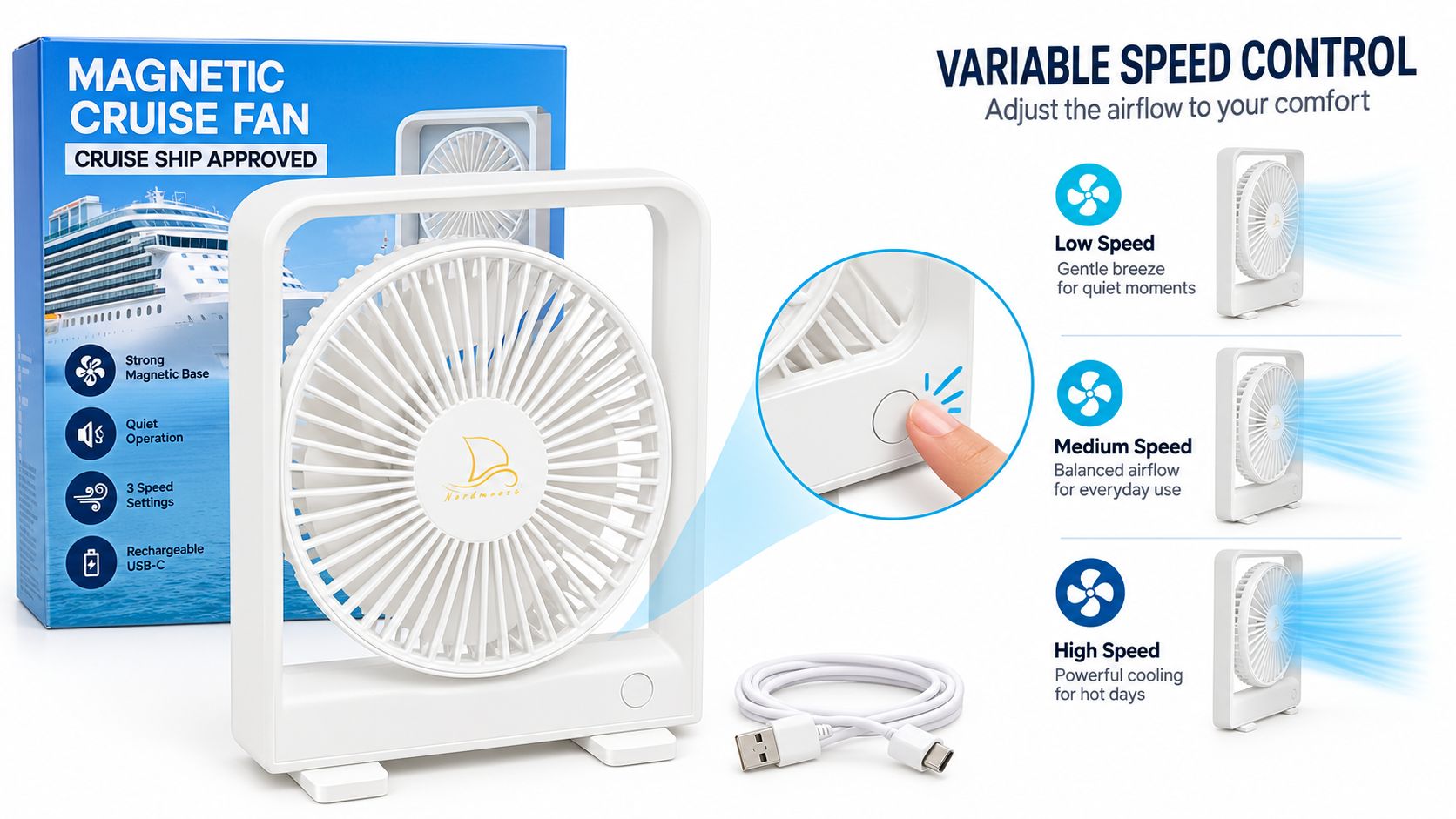
If a compact magnetic fan suits your packing setup, the Magnetic Fan for Cruise Ship Cabin uses a rechargeable USB-C design, a magnetic base, and three stated speed settings. Its listed runtime varies by speed and light use, so the relevant comparison is how long your chosen setting lasts, not the highest possible airflow.
How Different Control Methods Compare
Two fans can both say “variable speed” while producing a very different experience. The controller may change the electrical waveform, reduce the voltage, select preset operating points, or give you a more convenient way to command the electronics.
PWM control
Pulse-width modulation, or PWM, switches power rapidly and changes the proportion of time that power is applied. At a suitable setting, the motor receives enough energy to keep turning while the fan uses less power than it would at full speed.
The benefit is efficient control and strong starting behavior in a design that supports it. The drawback is sound. Some motors or fan frames make a faint clicking, buzz, or tonal whine at particular duty cycles. That sound may be more noticeable in a quiet cabin than it was during a quick test at home.
Voltage or current control
A voltage-based controller reduces the electrical level delivered to the motor. This can feel natural and smooth with compatible motors, but the motor may lose starting strength or become unstable at the bottom of the range. A controller designed for one motor type may perform poorly with another.
AC systems add another layer. Phase-angle controllers can provide continuous adjustment for suitable AC motors, but they may create low-speed noise and are generally less efficient than frequency-controlled drives. Sentera's explanation of electronic fan speed controllers contrasts these approaches with electronically commutated motors, which can retain stronger part-load efficiency.
Preset buttons
Preset buttons are often the most predictable option for a travel fan. The manufacturer chooses several operating points, then maps each button to one. You won't always get a perfectly even progression, but you can learn what each setting feels like without dealing with a mysterious slider.
A well-tuned four-step fan may be more useful than a fan with many closely spaced settings. What matters is whether the lowest setting starts cleanly, the middle setting feels different, and the motor remains quiet.
Remote and app control
A remote or app doesn't necessarily change the underlying motor-control method. It adds another interface, sometimes with a timer, a slider, or a way to change speed without reaching across the bed. That can be helpful when the fan is attached to a wall or ceiling.
The extra electronics also create more possible failure points. Pairing, battery condition, and line of sight can matter with a remote. A magnetic cruise fan with remote control is therefore worth evaluating not only for its remote, but also for whether the physical buttons remain usable when the remote is misplaced.
Why It Matters in a Cruise Cabin
A cruise cabin magnifies the practical effects of speed control. The fan may sit close to your head, attach to a metal surface beside the bed, or point across a narrow space shared by two people. You notice the character of the airflow, not just the fact that air is moving.
At a lower setting, a fan can create a gentle current that helps the room feel less still. At a higher setting, the airflow may become distracting, dry your eyes while reading, move papers, or send air toward the wrong berth. Comfort depends on placement and intensity together.
Four changes you can feel
- Sound: A stable low-speed motor can blend into the cabin's background noise. A poorly matched controller may click or whine even when the blades aren't moving quickly.
- Battery demand: Because fan power rises roughly with the cube of speed, reducing RPM can have a much larger effect on energy use than the airflow change suggests. U.S. energy guidance on fan affinity laws and variable-speed operation explains why suitable variable-speed fan retrofits can reduce energy use substantially.
- Sleep comfort: Gentle continuous airflow is often easier to tolerate than repeated bursts of maximum speed. You can aim the stream past the body rather than directly at the face, then raise the setting only if the cabin becomes uncomfortable.
- Shared-room manners: One berth may need more air than the other. A magnetic mount lets you change the height and direction without occupying a nightstand, but the base still needs a secure surface and a stable angle.
| Speed Setting | Approx. Noise (dB) | Overnight Runtime (4000 mAh) | Best Cabin Use |
|---|---|---|---|
| Low | Usually the quietest operating range | Depends on the motor, battery, and controller | Sleep and quiet rest |
| Low-medium | A gentle motor sound may be present | Generally longer than high operation | Reading and conversation |
| Medium-high | More airflow and more audible rotor sound | Shorter than lower settings | Warm cabins and daytime use |
| High | The loudest setting on most compact fans | The greatest battery demand | Short periods of strong circulation |
The exact noise and runtime figures belong to the particular fan, not to the phrase “variable speed.” Check whether the manufacturer measured sound at a stated distance, whether lighting affects battery claims, and whether the unit can operate while charging.
Commercial systems show why the underlying principle attracts so much attention. Natural Resources Canada documented a retrofit in which variable frequency drives reduced total electricity demand from about 322 kW to 133 kW, a 59% reduction, while annual fan electricity use fell from roughly 2,700,000 kWh to 1,100,000 kWh, also a 59% reduction. Those are large ventilation systems, not cabin fans, but they demonstrate the same physical relationship at a different scale. Natural Resources Canada's variable-frequency-drive guidance provides the measured example.
Best Speed Settings for Sleep, Reading, and Hot Ports
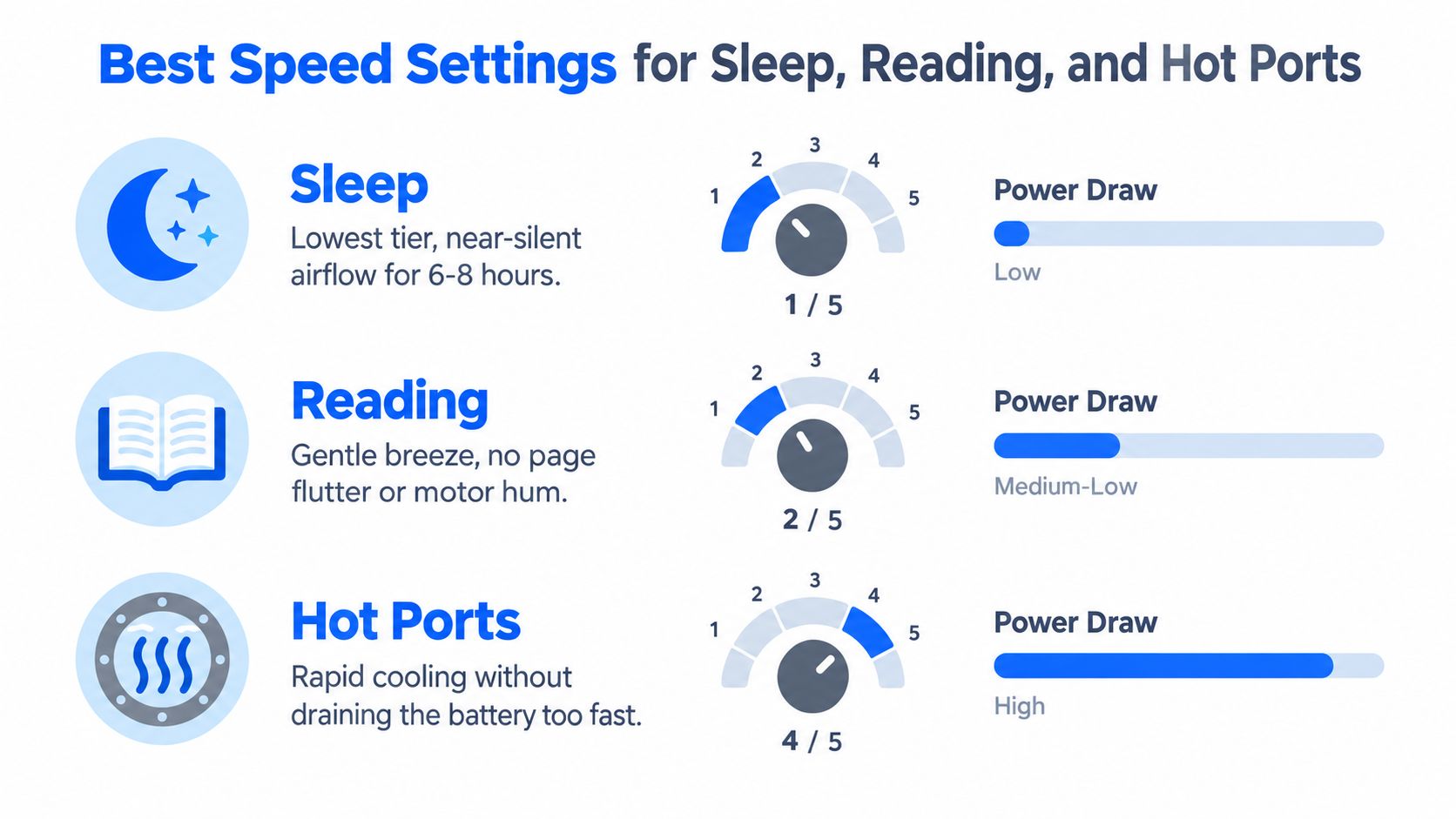
The right setting depends on what your body is doing and where the fan is pointed. Start with the lowest useful speed, then increase it in small steps. Don't assume the highest setting will cool you more effectively if the airflow is aimed at the wall, blocked by bedding, or too uncomfortable to leave running.
For sleep
Try the lowest setting first. If the air barely reaches the berth, use the second-lowest setting and aim the fan across the room rather than straight at your face. Cross-room airflow usually feels less forceful while still preventing the air immediately around the bed from becoming stagnant.
Listen for the motor after the room becomes quiet. A setting that sounds acceptable during packing may reveal a rhythmic click once the ship settles into its nighttime background noise. If one speed produces that sound, move up or down one step instead of assuming the fan is failing.
For reading and desk time
Choose a low or medium setting that keeps air moving without lifting pages or drying your eyes. Place the fan to the side of the reading light or laptop rather than directly behind your head. The aim is a broad, indirect current, not a concentrated stream.
If you're sharing the cabin, ask whether the airflow reaches the other person before increasing the speed. Repositioning the fan often solves a comfort problem more effectively than pressing the next button.
For hot ports
When the cabin feels warmer after a day in port, use a medium or high setting for a limited period. Close the curtains if sunlight is heating the room, and keep the fan away from obstructions so the rotor doesn't work against a blocked intake.
Battery capacity changes the decision. A smaller pack may be sufficient when you use low speed overnight, while a larger pack gives you more flexibility during a warm afternoon. Recharge during a meal, shore time, or another period when you aren't relying on the fan, and test whether the fan can operate safely while connected to power.
Practical sequence: Start low, aim across the room, wait a few minutes, then increase only if the cabin still feels uncomfortable.
A speed setting isn't a promise of a particular temperature. A portable fan moves air around you, but it doesn't replace the ship's air-conditioning system. Its value is personal comfort, especially when you need airflow at the bed or desk and don't want a bulky appliance taking up the limited counter space.
The Trade-Offs Nobody Talks About
The highest setting isn't automatically the most comfortable one. A small fan at full speed may produce a narrow stream that feels sharp rather than cooling, while the motor and blade noise become the dominant sound in the cabin. If you can aim a moderate stream across your body, you may feel better with less noise and less battery demand.
The number of speed labels can also mislead. Five buttons don't guarantee five clearly different experiences. Some controllers concentrate several presets within a narrow operating range, so the first few settings feel almost identical. A smaller number of well-spaced settings can be easier to use than a long list with little practical separation.
Judge the bottom of the range
A cruise fan earns its place in your luggage during the hours when you want it to operate without noise. Ask these questions before sailing:
- Does low speed start reliably? A fan that needs a high-speed push before it settles may be frustrating beside the bed.
- Is the sound smooth? A soft, steady airflow is easier to ignore than a periodic tick or tonal whine.
- Can you feel a difference between settings? The controls should create useful changes, not merely different labels.
- Does the mount stay stable? Vibration can turn a quiet motor into a rattling wall fixture.
- Can you direct the air properly? A powerful fan pointed at the wrong place is less useful than a modest fan aimed at the berth.

Fan size matters, but placement matters just as much. A larger rotor can move air effectively at a lower rotational speed, while a small rotor may need to spin faster for a similar personal breeze. The useful comparison isn't just large versus small. It's whether the fan can move air with low noise from its actual mounting position to where you sit.
The final trade-off is control method. TRIAC phase control, voltage reduction, PWM, electronically commutated motors, and frequency-controlled drives don't behave identically at part load. Technical guidance on fan controls notes that AC fans may use phase control or variable-frequency drives, with drives better suited to applications that spend substantial time below full speed and need broader low-speed control.
For a cruiser, the buying lesson is straightforward: evaluate the lowest usable setting, the sound at that setting, and the stability of the mount before being impressed by maximum speed or a long list of buttons.
You can also prepare for the night by understanding how to charge a rechargeable fan and checking whether your cable, adapter, and cabin outlet setup work together before embarkation.
Troubleshooting Common Speed and Noise Problems
Most fan complaints have a simple starting point. Before assuming the motor or controller has failed, inspect the blade, intake, mount, battery, and cable. A changed symptom often points to a changed setup.
A faint click or tick at low speed
PWM control can create an audible pulse at certain settings. A loose magnetic mount can add a second sound, especially if the fan is attached to a thin or vibrating surface.
Move the fan to a different secure metal area, check that the base is clean, and test the neighboring speed settings. If the sound disappears when the fan is held away from the wall, the mount or surface is contributing to the noise. If it follows one electrical setting everywhere, the controller is the more likely source.
Weak airflow at every setting
Check the intake and blade first. Dust, fabric, luggage, or a curtain can restrict the air entering the rotor. Make sure the fan isn't facing a wall at close range, and test it in open space.
If the airflow remains weak, compare the sound and rotation with the fan fully charged. A low battery can change behavior on some portable units, while a damaged blade or loose grille can reduce useful airflow and add vibration.
The remote or app won't pair
Start with the physical controls. Confirm that the fan has charge, remove any battery tab from the remote, and check that the remote isn't still in a storage or shipping state. For an app-controlled unit, close and reopen the app, then follow the product's pairing sequence rather than repeatedly pressing buttons at random.
Keep the remote close to the fan during setup. Once it works, store it somewhere consistent, because a small cabin makes misplaced accessories surprisingly easy to lose.
The battery drains much faster than expected
Check the speed setting first. A fan that has jumped from a low setting to high can consume energy much faster than it did during your initial test. Lighting, oscillation, and other built-in features may also draw from the same battery.
Then inspect the charging arrangement. A cable connected to a weak or shared power source may not restore the battery as expected, and a damaged cable can create intermittent charging. Compare performance after a complete charge using a known-good cable.
| Symptom | Likely Cause | Fastest Fix |
|---|---|---|
| Clicking at low speed | PWM sound or a loose mount | Test another speed and remount the fan |
| Weak airflow | Blocked intake, dirty blade, or poor placement | Clear both sides and move the fan into open space |
| Remote won't pair | Low charge, battery tab, or pairing mode issue | Charge the fan and restart the pairing process |
| Battery drains quickly | High-speed operation or extra features | Return to the intended speed and disable unused features |
If the symptom appeared suddenly, check the setup before blaming the fan.
Don't place fingers or objects near a moving rotor while troubleshooting. If the fan smells hot, shows swelling, exposes damaged wiring, or makes a harsh grinding sound, stop using it and follow the manufacturer's safety instructions.
Quick Pre-Cruise Checklist for Smarter Fan Use
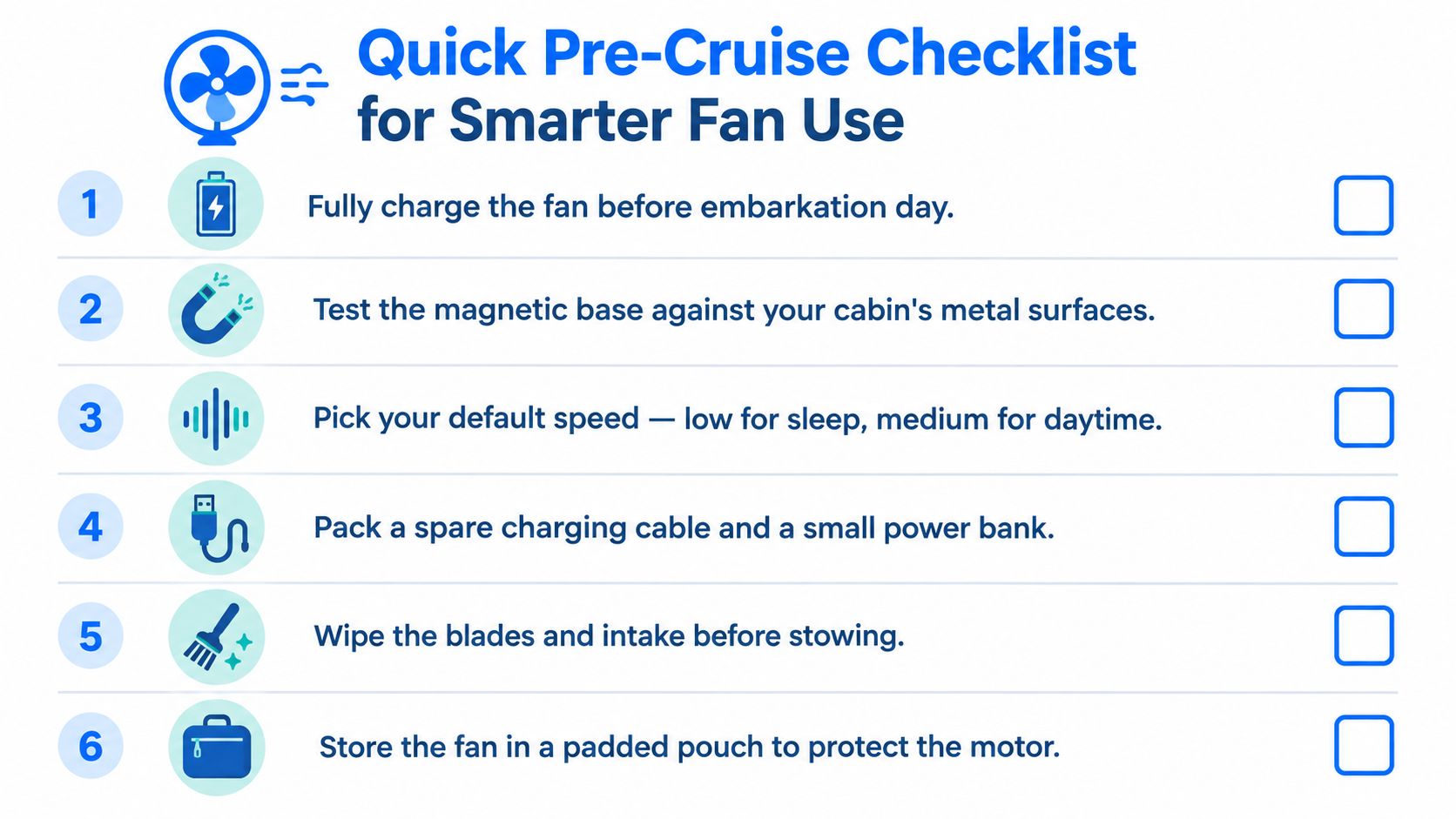
A few minutes at home can prevent a 2 a.m. search for a cable in a dark cabin. The best routine is simple: test the fan in the same way you'll use it onboard, including the low settings that matter most for sleep.
Six habits to pack with the fan
- Charge it before leaving home. Start the trip with a full battery rather than expecting to solve charging during embarkation.
- Test every speed. Sit near the fan, listen in a quiet room, and identify the setting that gives you usable airflow without an irritating tone.
- Check the magnetic base. Test the mount on suitable metal surfaces and confirm that the fan stays stable when tilted toward the bed.
- Choose a default sleep setting. Begin with the lowest or second-lowest option, then move up only when the cabin needs more circulation.
- Pack the charging cable. A short USB-C cable is easier to manage around a nightstand, while a spare can prevent a damaged or forgotten cable from ending the plan.
- Clean and protect it. Wipe the blades and intake, then place the fan in a padded pouch so the rotor and grille aren't crushed inside your luggage.
Mount the fan where it can circulate air without blowing directly into someone's face. Keep the cable away from walking paths, avoid covering the intake, and make sure the chosen surface can support the fan securely. Cruise cabin outlets and permitted charging equipment vary, so review cruise ship electrical outlets before you pack adapters or power accessories.
Variable speed control is a tool, not a challenge to use every button. You don't need to cycle through all the settings. You need to know which one fits the moment, whether that's a quiet night, a reading session, or a warm afternoon after returning from port.
Nordmoose offers compact cruise-cabin accessories, including magnetic rechargeable fans designed for limited cabin space and adjustable airflow. Visit Nordmoose to compare fan options and other practical gear before your next sailing.